You can easily use Google API services to enable your web application to get current location and places around.
Here's a simple guide:
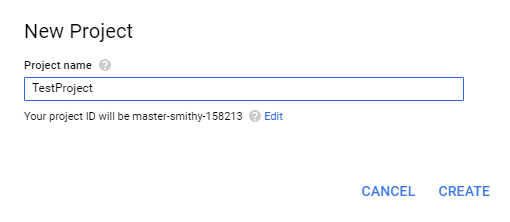
1. Create a new project
Go to Google API Console and create a new project.
2. Enable APIs
You will be directed to the API Manager panel. In the API library, search for the required APIs and enable them for your project. To get location, you would require the following location based APIs:
* Google Maps JavaScript API
* Google Maps Geocoding API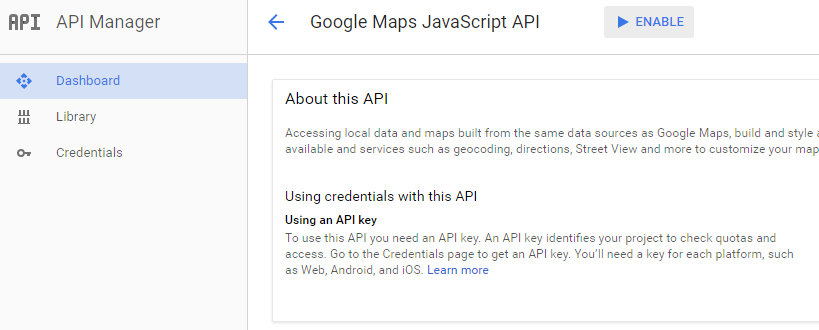
3. Create API keys
When enabling APIs, you will be directed to create the API keys for your project. In this task, you will only require a key for Google Maps JavaScript API. Created keys can be viewed in the Credentials panel.
4. Load Google Maps JavaScript API.
This should be done once the page loading has completed (the code has to be added at the end of the HTML code).
Enter your generated API key and include Google Places as a library in the same URL. The initMap callback
function is executed once the API is loaded.
<script
    src="https://maps.googleapis.com/maps/api/js?key=YOU_API_KEY&libraries=places&callback=initMap&language=en"
    async defer>
</script>
5. Add a map to your application.
You can style the map element as required.
<style>
  #myPlacesMapView{
    bottom: 0;
    right: 0;
    position: fixed;
    z-index: 1;
}
  #map{
    margin-top: 150px;
    margin-left: 50px;
    padding-top: 150px;
    width: 600px;
    height: 400px;
    background-color: #5bc0de;
}
</style>

<div id="myPlacesMapView">
     <div id="map"></div>
</div>
6. Now define the callback function.
function initMap() {
    // Try HTML5 geolocation to get the current location
    var pos;
    if (navigator.geolocation) {
        navigator.geolocation.getCurrentPosition(function (position) {
                pos = {
                    lat: position.coords.latitude,
                    lng: position.coords.longitude
                };
                // Set current location as the center of the map and add a marker to the map
                map = new google.maps.Map(document.getElementById("map"), {
                    center: {lat: position.coords.latitude, lng: position.coords.longitude},
                    zoom: 14
                });
                marker = new google.maps.Marker({
                    map: map,
                    position: pos
                });
                var infowindow = new google.maps.InfoWindow();

                // Use geocoding to get the address of current location
                var geocoder = new google.maps.Geocoder();
                var latlng = new google.maps.LatLng(pos.lat, pos.lng);
                geocoder.geocode({
                        'latLng': latlng
                    }, function (results, status) {
                        if (status == google.maps.GeocoderStatus.OK) {
                            if (results[0]) {
                                var location = results[0];
                                var address_main = location.formatted_address;
                                placeID = location.place_id;

                                // Use Places library to get the name and other details of current location
                                var service = new google.maps.places.PlacesService(map);
                                service.getDetails({
                                        placeId: placeID
                                    }, function (place, stat) {
                                        if (stat == google.maps.places.PlacesServiceStatus.OK) {
                                            var name = place.name;
                                            infowindow.setContent('<div><strong>  You\'re here:  ' + place.name + '</strong><br>' +
                                                place.vicinity + '</div>');
                                            infowindow.open(map, marker);
                                        }
                                    }
                                );
                            }
                            else {
                                alert("address not found");
                            }
                        }
                        else {
                        }
                    }
                );
            },
            function () {
                handleLocationError(true, map.getCenter());
            }
        );
    } else {
        // Browser doesn't support Geolocation
        handleLocationError(false, map.getCenter());
    }
}

function handleLocationError(browserHasGeolocation, infoWindow, pos) {
    infoWindow.setPosition(pos);
    infoWindow.setContent(browserHasGeolocation ?
        'Error: The Geolocation service failed.' :
        'Error: Your browser doesn\'t support geolocation.');
}
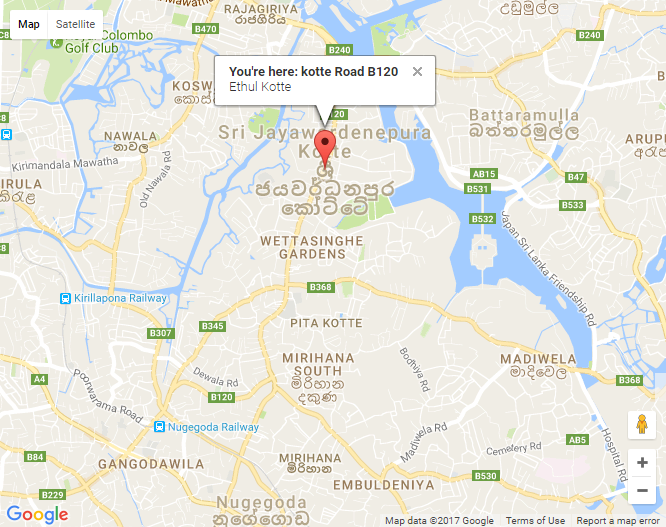
When this is executed, your application will display a map with current location details.
That's it! Happy coding!